If your team still sends purchase orders by email and then waits to hear back, you will know the feeling: was the PO received, has the supplier accepted it, and will the goods arrive when promised? Good purchase order software answers those questions for you. i2B takes the guesswork out of the purchase order stage of Purchase-to-Pay, from the approved requisition right through to delivery and invoice.
Where purchase orders go wrong
The purchase order sits at the centre of the buying process, yet it is often the point where visibility disappears. Common problems include:
- POs that never reach the right person at the supplier
- Orders that are received but never acknowledged
- Changes to dates, prices or quantities agreed by phone or email and never recorded
- Invoices that arrive before the goods, or without a PO reference
Each of these leads to chasing, rework and delayed payments. i2B was built by procurement and ERP professionals to tackle exactly these pain points.
From approved requisition to purchase order, automatically
In i2B, the purchase order starts with a requisition. An approval matrix works out who needs to approve each request, based on rules such as spend limit, department, location or cost centre. Approvers receive an email and can approve or decline with a single click.
Once a requisition is fully approved, i2B can create the RFQ or purchase order in your ERP system automatically, with no manual re-keying. If you run an RFQ first, the approved RFQ can become a PO in the same way. You can read more about this first step in our post on how online requisitioning can help procurement.
Purchase order software features that end the chasing
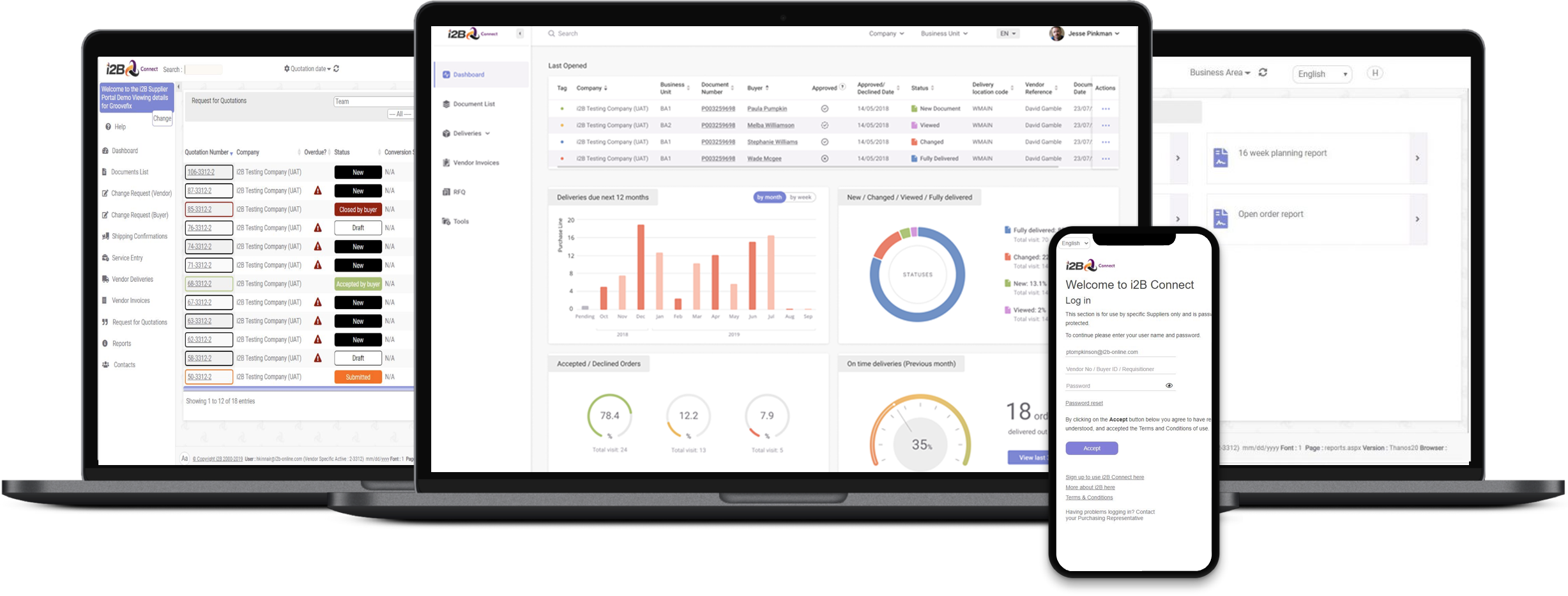
This is where i2B does most of the heavy lifting. Its purchase order module gives buyers:
- Confirmation of receipt: you can see when the supplier has received the PO.
- Automatic reminders: suppliers are prompted to acknowledge, accept or decline each order.
- Online change requests: changes to delivery dates, pricing and order quantities are requested and agreed inside i2B.
- Full change history: every amendment is recorded, so there is one version of the truth.
- Shared performance data: suppliers can see open orders, forecasts and on-time delivery statistics, helping both sides maintain standards.
Suppliers work through the free i2B Supplier Portal, which needs no installation and runs on any device. We looked at the supplier side in more detail in Are You and Your Suppliers on the Same Page?
Deliveries and invoices that match the order
A purchase order is only useful if what arrives, and what is invoiced, matches it. i2B can generate bar-coded delivery notes that identify the PO number, line number, part number and quantity being shipped, and suppliers can attach documents such as quality certificates.
When the invoice arrives, i2B performs 2-way or 3-way matching, so suppliers can only invoice against ordered and delivered quantities. It can also require goods to be receipted before an invoice is raised, and it validates PO, line and part references on the invoice. Paired with i2B AP Automation, this gives finance a much cleaner route from order to payment.
Works alongside your ERP
i2B is cloud-based SaaS that sits alongside your existing ERP rather than replacing it, with integration for SAP, Oracle, Infor and Microsoft Dynamics. Your ERP remains the system of record, while i2B gives buyers, finance and suppliers a shared, real-time view of every order. Full audit trails, dashboards and vendor performance reports show what is happening across your spend. See the full picture on our Purchase To Pay Solution page.
Frequently asked questions
What is purchase order software?
Purchase order software lets you create, send, track and manage purchase orders digitally. In i2B, POs are created from approved requisitions or RFQs, sent to suppliers through a portal, tracked through acknowledgement and delivery, and matched against invoices.
Can i2B create purchase orders in my ERP?
Yes. Once a requisition or RFQ is fully approved, i2B can create the purchase order in your ERP system automatically. i2B integrates with SAP, Oracle, Infor and Microsoft Dynamics.
How do suppliers receive and respond to POs in i2B?
Suppliers use the free i2B Supplier Portal, which needs no installation and works on any device. They can acknowledge, accept or decline orders, request changes and create delivery notes.
How does i2B handle changes to a purchase order?
Changes to delivery dates, pricing or quantities are requested and agreed inside i2B, and every amendment is kept in a full change history for the PO.
Ready to get your purchase orders on track?
If chasing suppliers for PO confirmations is eating into your team’s day, i2B can help. Contact us for a free demo and see how i2B purchase order software works alongside your ERP.